File in a browser, too.
Use folder suggestions and filing in Outlook on the web as well as Classic Outlook on Windows. Common MailTuck preferences are saved in your Microsoft 365 mailbox and shared between both versions.

Outlook email filing, compared
Keep the folders you know. MailTuck helps you find a destination, file a reply and undo a recent move in Outlook Classic on Windows and Outlook on the web.
Considering a SimplyFile, QuickFile365, Folder Suggest or Peach alternative? Compare the filing tasks and Outlook versions that matter to you below.
If your work takes you between desktop Outlook and a browser, MailTuck is an alternative worth trying with your own mailbox. It adds filing tools to Outlook; you keep your existing email client and folder structure.
Published by the MailTuck team at Happy PC. Comparison checked on using the vendor sources linked below. This is a documentation comparison, not a performance benchmark.
Use folder suggestions and filing in Outlook on the web as well as Classic Outlook on Windows. Common MailTuck preferences are saved in your Microsoft 365 mailbox and shared between both versions.
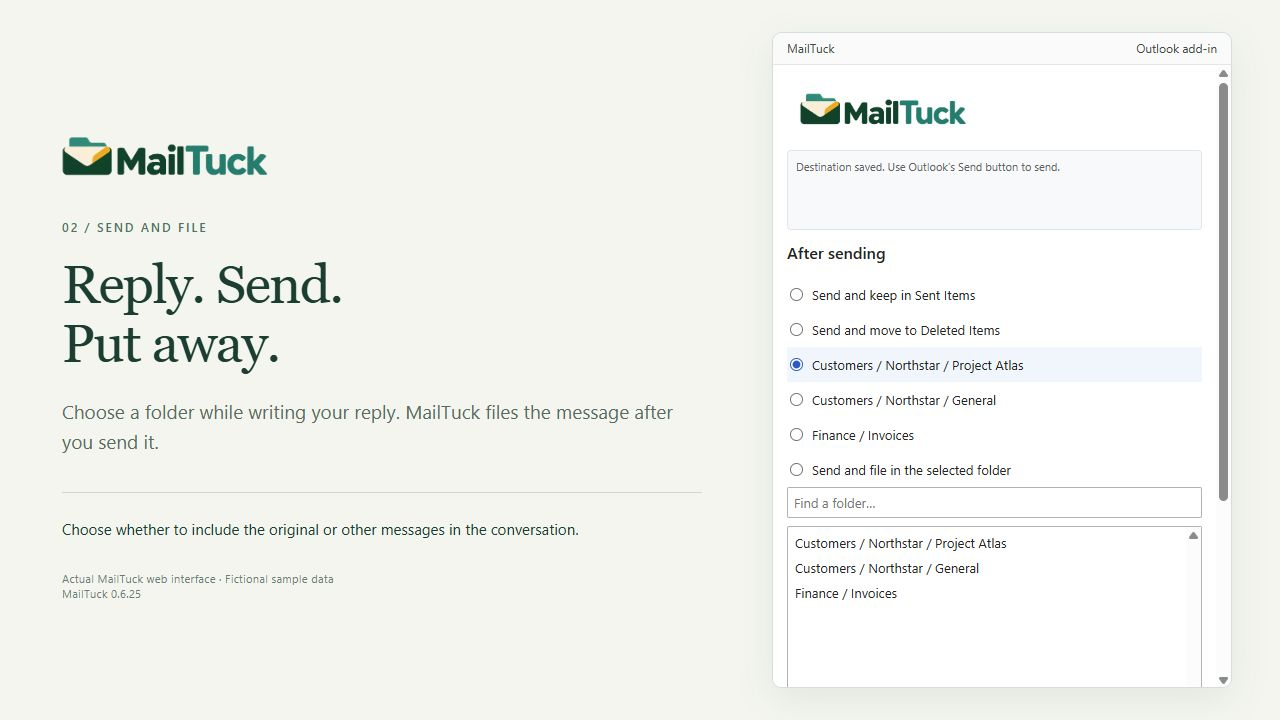
Pick a destination for a reply and choose whether to file the original with it. Send & File is part of MailTuck's workflow, alongside selected conversation filing.
Review recent filings and undo supported recent moves. The optional Classic extension also lets you open a destination folder directly in Outlook.
Send & File and folder suggestions are also offered by other products. MailTuck's appeal is the combination and workflow, rather than an exclusive claim to these features. Filing undo does not recall a sent message.
| What matters? | MailTuck | SimplyFile |
|---|---|---|
| Outlook versions | Outlook Classic on Windows and Outlook on the web are the supported workflows described here. We do not claim tested Mac or new Outlook support. | TechHit lists Classic Outlook for Windows; its documentation says new Outlook and Outlook Web Access are not supported. Compatibility source |
| Folder suggestions | Suggestions based on correspondence and filing choices, with folder search when you want another destination. | Learns filing habits and predicts a destination, with one-click filing. Feature source |
| Sent email and conversations | Send & File, optional filing of the original with a reply, and selected conversation filing. | Send & File is in Standard; thread, sender and batch filing are listed in Pro. Edition source |
| Processing and privacy | The web service processes Microsoft Graph requests for supported mailbox actions. Classic also uses local data. See the MailTuck privacy notice for the distinction. | TechHit states that SimplyFile runs locally inside Outlook and does not send email data to its servers. Privacy source |
| Tools beyond filing | Focuses on folder selection, filing, recent filing history and undo. Check the FAQ for current capabilities and limits. | Depending on edition, includes task and appointment tools, snooze, bulk commands and enterprise options. Full feature list |
| Purchase and deployment | Subscription through Microsoft Marketplace. License assignment, add-in deployment and permission approval are separate steps; Classic installation is separate. | Standard, Pro and Ultimate subscriptions; TechHit also lists centrally managed deployment options. Plans and deployment |
Choose MailTuck when browser filing is important alongside Classic Outlook. SimplyFile may fit better when you need its broader desktop toolset or prefer its entirely local processing model. Neither choice is a universal winner.
Compare the same tasks across more than two tools. The following summaries describe published features; we have not run independent accuracy or speed tests.
QuickFile365 lists folder suggestions, thread filing and Send & File. Its pricing page describes Windows, Mac and web support, with shared-mailbox filing in Ultimate. Check QuickFile365 features and plans.
MailTuck is worth trying if you want a filing workflow across Classic Outlook on Windows and Outlook on the web, with common preferences stored in your mailbox and undo for supported recent moves. QuickFile365 already offers many overlapping features; we have not established a general MailTuck advantage in speed, accuracy or price.
Before switching: compare reply filing, the original-message options, shared-mailbox behavior and the exact clients you need. QuickFile365's broader advertised client coverage may be a better fit if Mac or new Outlook support is essential.
Folder Suggest describes on-device AI and a free plan limited to five filed emails per day. Its team page lists Classic, new Outlook, web and Mac. Check Folder Suggest team and free plans.
Consider MailTuck if your requirements include choosing a destination before sending a reply, filing the original alongside it, and reviewing recent filings. These are demonstrated MailTuck workflows; we have not independently tested whether Folder Suggest offers equivalent behavior.
Before switching: compare these specific tasks rather than assuming folder suggestions alone cover your needs. Folder Suggest may suit lighter usage or a preference for on-device AI. MailTuck's hosted web service processes Graph requests, so read our privacy notice when comparing processing models.
Peach describes a focused Classic Outlook workflow with suggestions, folder-path search and immediate undo. Its own comparison says it does not currently reproduce Send & File. Check Peach's published comparison.
MailTuck offers concrete additional workflows if you need to file replies as you send or also file messages in Outlook on the web. You can choose whether to file an original message with its reply and share common preferences between Classic and web.
Before switching: try those extra workflows with your own mailbox. If you only need selected-message filing in Classic Outlook, Peach's narrower approach may already cover your requirements.
This gives you evidence for your own workflow. We do not claim MailTuck is faster, more accurate or cheaper than every alternative.
No. MailTuck is an Outlook email filing add-in. It works with your existing mailbox folders, and you choose where messages go. It is an alternative filing workflow, not a replacement email client.
Yes. Outlook on the web is a supported MailTuck workflow, alongside Outlook Classic on Windows. Your Microsoft 365 organization may need to approve permissions and deploy the add-in. See installation help.
We do not offer a SimplyFile settings or training importer. Your existing Outlook folders remain available; choose MailTuck preferences and test its suggestions with your own messages.
MailTuck is offered as a paid subscription. Check the Microsoft Marketplace listing for current pricing and trial terms. Installing the add-in alone does not provide a license.
This page makes support claims only for the MailTuck workflows we have verified: Classic Outlook on Windows and Outlook on the web. Do not assume that web add-in technology by itself guarantees support in another client. Contact support about your setup.
If you want an alternative to SimplyFile, QuickFile365, Folder Suggest or Peach for Classic Outlook and browser-based Outlook, take a look at MailTuck with your own Microsoft 365 mailbox.